
Are Excel Files CSV Files?

If you've ever saved a spreadsheet or tried to import data somewhere, you've probably run into both .xlsx and .csv files and wondered whether they're the same thing.
Contents:
Quick Answer
No, Excel files and CSV files are not the same thing. Excel files (.xlsx) store data in a proprietary binary format that supports formatting, formulas, multiple sheets, and more. CSV files (.csv) are plain text files that store only raw data, separated by commas. Excel can open and save both formats, but they are fundamentally different file types.
What Is an Excel File?
An Excel file typically has the extension .xlsx (or the older .xls). It's a binary file format developed by Microsoft that can hold a lot more than just numbers and text.
Inside an .xlsx file you can have multiple worksheets, cell formatting (colors, fonts, borders), formulas, charts, pivot tables, images, and more. All of that extra structure is why Excel files tend to be larger than CSV files.
What Is a CSV File?
CSV stands for Comma-Separated Values. A CSV file is just a plain text file where each row of data is a new line, and each column is separated by a comma.
Here's what a simple CSV looks like if you opened it in a text editor like Notepad:
Name,Sales,Region
John Smith,4200,East
Lisa Chen,5100,West
Marcus Webb,3800,North
That's it. No formulas. No formatting. No multiple sheets. Just raw data.
Because CSV is plain text, it can be opened by almost any program, not just Excel. Databases, web apps, and data tools all love CSV because it's a universal format.
Key Differences Between Excel and CSV Files
Here's a quick breakdown of how the two formats differ:
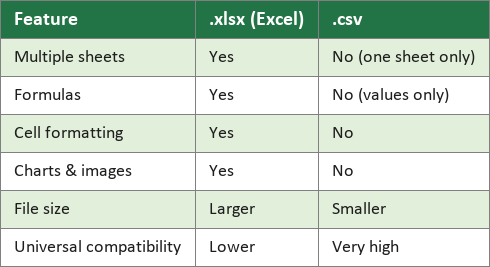
One thing that trips people up: when you save an Excel file as a CSV, Excel will warn you that features like multiple sheets and formatting will be lost. That warning is telling you exactly this, the CSV format simply cannot store that information.
When to Use Each Format
Use an .xlsx file when you're doing actual work in Excel, writing formulas, formatting reports, using multiple sheets, or building charts. It's the right home for anything you're actively building or editing.
Use a CSV when you need to share or move raw data somewhere else. Uploading a customer list to a CRM, importing products into an e-commerce platform, or handing data off to a developer are all classic CSV use cases. CSV's simplicity is its strength in those situations.
It's also worth knowing that Excel handles CSV files quietly in the background. When you double-click a .csv file, Excel opens it and it looks just like a normal spreadsheet. But the moment you save it back, you're saving plain text, not an Excel workbook. If you want to keep your work in Excel format, use "Save As" and choose .xlsx.
For more on how Excel handles files and data, check out our post on how to automatically combine multiple files into one.



Comments